iOS App
Folio PDF – Native iOS PDF Reader
SwiftSwiftUIPDFKitSwiftDataUIKitSwift ConcurrencyXCTest
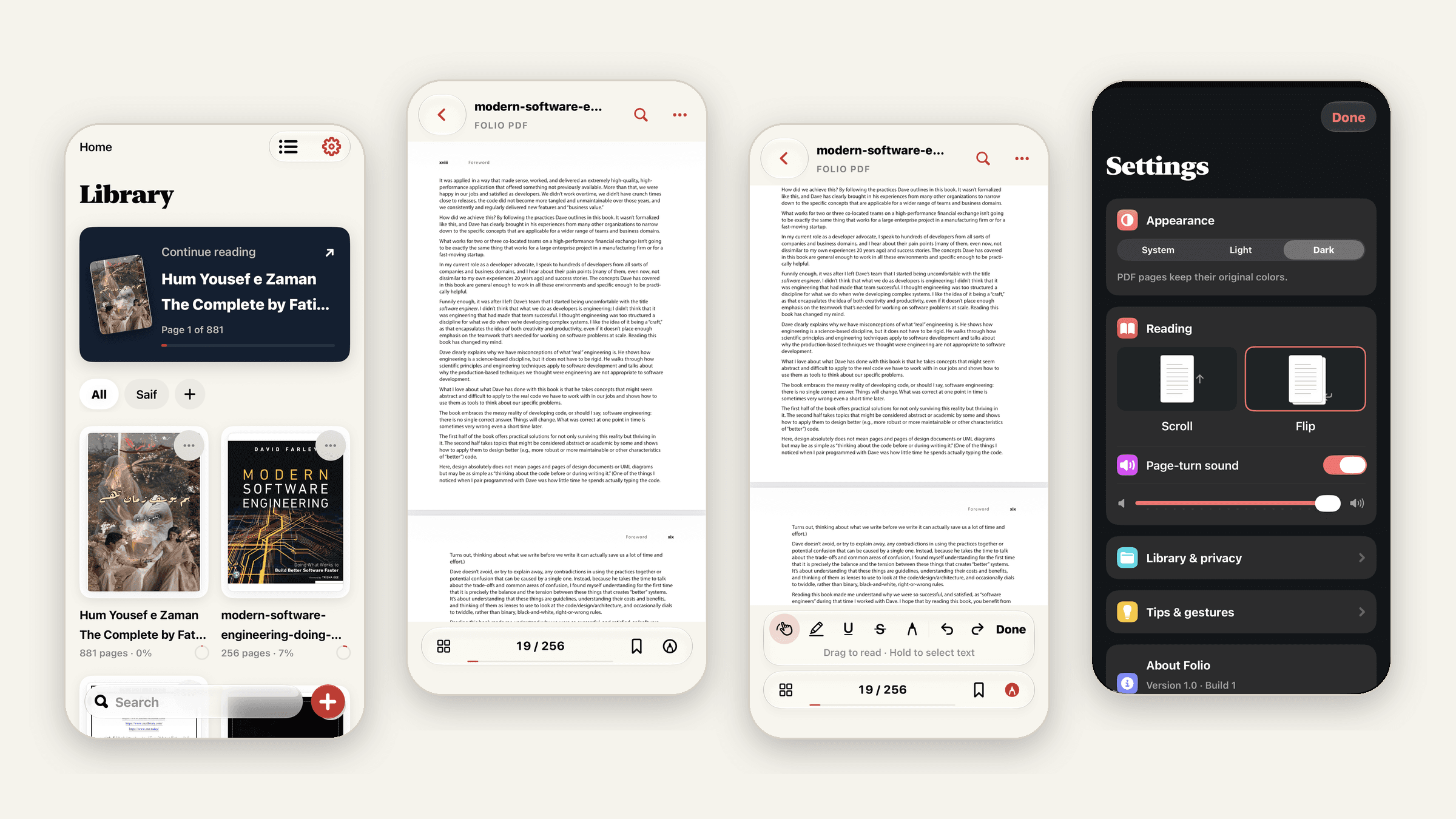
A native PDF reader for iPhone that feels like reading a real book. Folio keeps your library organized, remembers where you stopped and lets you highlight, underline and draw on any page. Everything stays on your phone: no accounts, no analytics and no network requests.
The challenge
Most PDF apps on the App Store are either bare file viewers or heavy office suites full of subscriptions, sign-ins and cloud uploads. I wanted a reader built just for reading: fast with 800-page books, pleasant for long sessions and fully private. It also had to be safe with your files. Annotating a PDF should never risk damaging the original.
What I built
- Library: folders, grid and list layouts, title search and a Continue reading card that reopens your last book on the page you left. Each cover shows your reading progress.
- Two reading modes: smooth vertical scroll, or Flip, a book-style page curl with an optional page-turn sound and volume control.
- Annotations: highlight, underline, strikethrough, pen drawing and notes, with undo/redo and autosave after every edit.
- Safe exports: Share PDF creates a copy with your annotations embedded. The original file is never modified, and password-protected PDFs keep their protection.
- Navigation: bookmarks, page thumbnails, a page scrubber, jump-to-page and full-text search.
- Private by design: no backend, no accounts and no tracking. Passwords for protected PDFs are never stored.
- Built for everyone: light and dark themes, Dynamic Type, VoiceOver actions and Reduce Motion support.
How it works under the hood
- Originals stay byte-identical. Annotations are saved in a separate, versioned JSON file for each document and are only merged into the PDF when you export. If you never annotate, Share sends the original bytes unchanged.
- Imports you can trust. Files are streamed in through a temporary file while they are hashed with SHA-256, so an interrupted import never leaves a broken file behind. Importing the same PDF twice reuses the existing entry.
- No lost work. Every edit becomes an ordered save snapshot that is written atomically. If a save fails, a banner offers Retry and the reader stays open until your changes are safe.
- Smooth with big books. File work and thumbnail rendering run on their own Swift actors, away from the main thread, so scrolling and saving never wait on each other. Thumbnails are cached in memory (32 MB) and on disk (24 MB), and pages from decrypted PDFs are never written to disk.
- Safe upgrades. The library store is versioned. Before a migration runs, the old data is backed up automatically.
- Tested: 65 unit tests and 26 UI tests cover the library, both reading modes, migrations and performance.
Tech behind it
- Swift + SwiftUI for the whole interface, with UIKit only where PDFKit needs it: the PDF view, the page-curl controller and drawing gestures.
- PDFKit for rendering, text selection, search and annotations.
- SwiftData for the library, folders, bookmarks and reading progress.
- Swift Concurrency (actors and
@MainActor) to keep file work, rendering and UI separate. - XCTest + XCUITest for unit and end-to-end UI tests.
- Zero third-party dependencies. Folio uses only Apple frameworks, so it is small, fast and easy to maintain.
Folio is open source under the MIT License. View the source code on GitHub.